
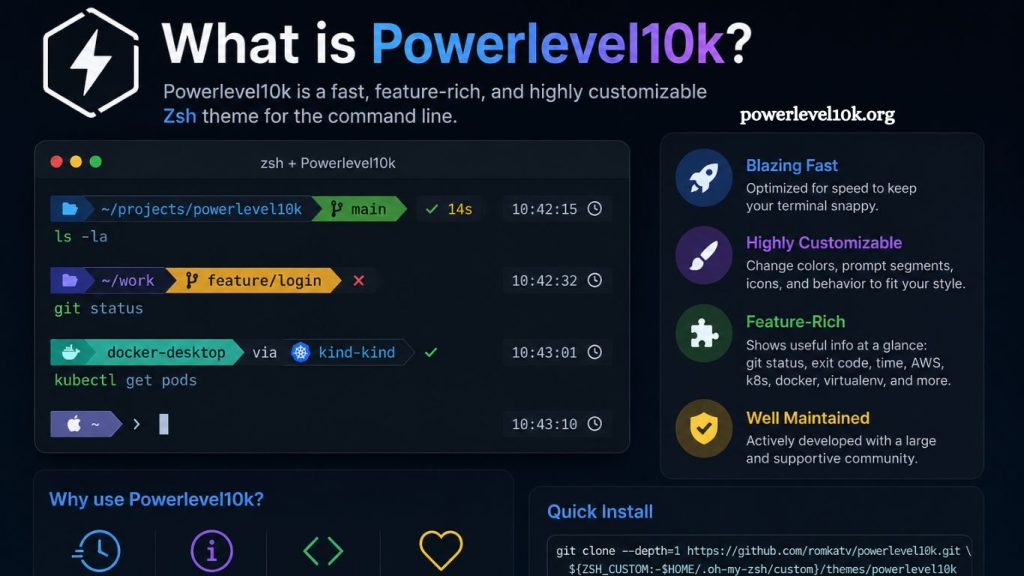
Developers spend countless hours inside terminal windows. Speed, clarity, and customization matter when every command affects productivity. Powerlevel10k transforms the default terminal experience into a fast, visually appealing, and highly efficient workspace for modern developers.
Powerlevel10k ranks among the most popular themes for Zsh users because it combines performance with deep customization. Coders, DevOps engineers, Linux users, and system administrators prefer it for its lightning-fast rendering, flexible prompts, and professional appearance.
This guide explains everything about Powerlevel10k, including features, benefits, installation steps, customization options, and reasons developers choose it over traditional terminal themes.
Read More: What is Powerlevel10k?
Understanding Powerlevel10k
Powerlevel10k is a high-performance theme for the Zsh shell. It enhances terminal prompts by adding useful visual information, icons, Git status indicators, command execution times, directory paths, and productivity-focused shortcuts.
Built as an evolution of Powerlevel9k, Powerlevel10k focuses heavily on speed and responsiveness. Developers often use it alongside Zsh frameworks such as Oh My Zsh to create cleaner and smarter command-line environments.
Unlike basic terminal prompts, Powerlevel10k provides real-time insights directly inside the shell. Users can instantly view:
- Current Git branch
- Repository status
- Virtual environments
- Node.js version
- Python version
- Kubernetes context
- Background jobs
- Execution time
- System status
This information appears dynamically without slowing terminal performance.
Why Developers Use Powerlevel10k
Modern development workflows involve multiple tools, repositories, environments, and cloud systems. Standard terminal prompts fail to provide enough context for fast decision-making.
Powerlevel10k solves this problem by displaying essential information directly inside the command line.
Faster Workflow
Developers switch between projects frequently. Powerlevel10k reduces friction by instantly showing repository details and environment information.
Instead of typing extra commands, users can quickly identify:
- Active Git branch
- Uncommitted changes
- Current programming environment
- Connected server context
This visibility speeds up development tasks.
Exceptional Performance
Many terminal themes become sluggish when large repositories load. Powerlevel10k avoids performance bottlenecks through optimized rendering.
Even complex prompts remain responsive and smooth. Developers working inside massive Git repositories notice significant speed improvements compared to older themes.
Highly Customizable Interface
Powerlevel10k offers extensive customization capabilities. Users can modify:
- Colors
- Fonts
- Icons
- Prompt layout
- Segments
- Spacing
- Git indicators
- Command styles
This flexibility helps developers create personalized terminal setups that match their workflow preferences.
Clean Visual Design
A cluttered terminal reduces productivity. Powerlevel10k maintains a clean structure while displaying valuable information.
Its minimalist yet informative design improves readability during coding sessions.
Key Features of Powerlevel10k
Powerlevel10k includes numerous advanced features that improve terminal usability.
Instant Prompt
Instant Prompt loads the terminal immediately before completing full initialization. Users can start typing commands without waiting for plugins to finish loading.
This feature dramatically improves startup speed.
Git Status Integration
Git integration remains one of Powerlevel10k’s strongest capabilities.
Users can instantly view:
- Modified files
- Untracked files
- Ahead/behind branch status
- Merge conflicts
- Staged changes
This functionality helps developers manage repositories efficiently.
Transient Prompt
Transient Prompt reduces visual clutter by minimizing the display of previous command prompts after execution.
Long terminal sessions become cleaner and easier to navigate.
Right-Side Prompt
Powerlevel10k supports right-aligned information displays. Users can place:
- Execution times
- Status codes
- Background tasks
- System indicators
on the right side of the terminal.
This layout improves organization without overcrowding the main prompt area.
Extensive Language Support
Powerlevel10k detects multiple development environments automatically, including:
- Python
- Node.js
- Go
- Rust
- Java
- Ruby
- Docker
- Kubernetes
Developers receive immediate environment feedback while working across projects.
Nerd Font Compatibility
Powerlevel10k uses Nerd Fonts to display attractive icons and symbols.
These icons improve readability and create a modern developer interface.
Powerlevel10k vs Powerlevel9k
Many users compare Powerlevel10k with its predecessor, Powerlevel9k.
Although both themes provide advanced prompts, Powerlevel10k introduces substantial improvements.
| Feature | Powerlevel9k | Powerlevel10k |
|---|---|---|
| Performance | Moderate | Extremely Fast |
| Startup Speed | Slower | Instant Prompt |
| Customization | Good | Advanced |
| Git Integration | Standard | Optimized |
| Responsiveness | Average | High |
| Maintenance | Limited | Active Development |
Powerlevel10k delivers better speed, cleaner rendering, and more efficient Git handling.
Installing Powerlevel10k
Installation remains straightforward for most Linux and macOS users.
Step 1: Install Zsh
Powerlevel10k requires Zsh.
Ubuntu users can install Zsh with:
sudo apt install zshmacOS users usually already have Zsh installed by default.
Step 2: Install Oh My Zsh
Oh My Zsh simplifies plugin and theme management.
Install it using:
sh -c "$(curl -fsSL https://raw.githubusercontent.com/ohmyzsh/ohmyzsh/master/tools/install.sh)"Step 3: Clone Powerlevel10k
Download Powerlevel10k into the custom themes directory:
git clone --depth=1 https://github.com/romkatv/powerlevel10k.git \
${ZSH_CUSTOM:-$HOME/.oh-my-zsh/custom}/themes/powerlevel10k
Step 4: Enable Theme
Open the .zshrc configuration file and change:
ZSH_THEME="powerlevel10k/powerlevel10k"Save the file and reload Zsh:
source ~/.zshrcStep 5: Run Configuration Wizard
Powerlevel10k automatically launches a setup wizard after installation.
Users can choose:
- Prompt styles
- Icon sets
- Colors
- Layout options
- Unicode compatibility
The wizard quickly creates an optimized configuration.
Best Powerlevel10k Features for Productivity
Developers often install Powerlevel10k for productivity gains rather than aesthetics alone.
Smart Git Indicators
Git information appears instantly without repeatedly running status commands.
This saves time during branch switching and code reviews.
Context Awareness
Powerlevel10k changes dynamically based on:
- Current directory
- Active environment
- Repository status
- Remote server session
Context-aware prompts reduce mistakes during deployments and server management.
Command Execution Timing
Long-running commands display execution times automatically.
Developers can monitor performance directly inside the terminal.
Multi-Line Prompt Support
Multi-line prompts improve readability for lengthy commands.
Complex workflows become easier to manage.
Customizing Powerlevel10k
Customization remains one of Powerlevel10k’s strongest advantages.
Most settings live inside the .p10k.zsh configuration file.
Users can personalize nearly every visual element.
Changing Prompt Styles
Powerlevel10k supports:
- Lean prompts
- Classic prompts
- Rainbow prompts
- Minimal prompts
Minimal setups appeal to developers who prefer distraction-free environments.
Adjusting Colors
Users can customize:
- Background colors
- Text colors
- Git indicators
- Warning symbols
- Error messages
Color customization improves visibility and workflow comfort.
Enabling Icons
Nerd Fonts unlock advanced icon support.
Popular Nerd Fonts include:
- MesloLGS NF
- FiraCode Nerd Font
- Hack Nerd Font
MesloLGS NF remains the recommended option for Powerlevel10k.
Adding Custom Segments
Advanced users can create custom prompt segments displaying:
- CPU usage
- RAM status
- VPN state
- Weather updates
- API environments
Custom segments help developers monitor essential system information directly from the terminal.
Common Powerlevel10k Problems
New users occasionally face setup issues.
Missing Icons
Incorrect fonts usually cause broken icons.
Installing Nerd Fonts and updating terminal font settings resolves this issue.
Slow Startup
Too many plugins in Oh My Zsh can slow initialization.
Reducing unnecessary plugins improves startup performance.
Prompt Misalignment
Unicode rendering problems sometimes affect prompt alignment.
Using compatible terminal emulators fixes formatting issues.
Recommended terminal applications include:
- iTerm2
- Windows Terminal
- Alacritty
- Kitty
Best Terminal Setup with Powerlevel10k
Professional developers often combine Powerlevel10k with productivity-focused tools.
Recommended Stack
Popular combinations include:
- Zsh
- Oh My Zsh
- Powerlevel10k
- tmux
- fzf
- bat
- zoxide
This setup creates a powerful command-line workflow optimized for development.
Powerlevel10k for DevOps Engineers
DevOps professionals continuously manage servers, containers, and cloud systems.
Powerlevel10k simplifies infrastructure workflows through:
- Kubernetes context indicators
- AWS profile visibility
- Docker environment awareness
- SSH session detection
These features reduce deployment mistakes and improve operational efficiency.
Powerlevel10k for Programmers
Programmers working across multiple languages benefit from automatic environment detection.
Powerlevel10k identifies:
- Python virtual environments
- Node.js versions
- Java SDK versions
- Go environments
Environment visibility prevents configuration conflicts during development.
Security Benefits of Context-Aware Prompts
Accidental production deployments create serious risks.
Powerlevel10k helps prevent mistakes by displaying:
- Active Kubernetes clusters
- SSH sessions
- Root access indicators
- Production environments
Clear visual indicators improve operational safety.
Performance Optimization Tips
Power users can further optimize Powerlevel10k performance.
Reduce Plugin Usage
Too many plugins slow down the startup.
Keep only essential plugins enabled.
Enable Instant Prompt
Instant Prompt dramatically improves terminal responsiveness.
Most users should keep it enabled.
Use Lightweight Terminal Emulators
Modern terminal applications significantly improve rendering speed.
Kitty and Alacritty work especially well with Powerlevel10k.
Powerlevel10k Community and Support
Powerlevel10k maintains a large developer community.
Users can access:
- GitHub documentation
- Configuration examples
- Community themes
- Troubleshooting guides
Strong community support makes customization easier for beginners.
Future of Powerlevel10k
Terminal productivity tools continue evolving rapidly.
Powerlevel10k remains relevant because it balances:
- Speed
- Functionality
- Design
- Flexibility
Developers increasingly rely on advanced terminal environments for cloud-native development, DevOps automation, and software engineering workflows.
Frequently Asked Questions
Does Powerlevel10k slow down the terminal?
No, Powerlevel10k focuses heavily on speed optimization and delivers one of the fastest prompt experiences available for Zsh users.
Can Powerlevel10k display Git information?
Yes, Powerlevel10k provides real-time Git status updates, including branches, staged files, untracked files, merge conflicts, and commit status.
Is Powerlevel10k available for Linux and macOS?
Yes, Powerlevel10k supports Linux, macOS, and Windows environments that use Zsh-compatible terminal setups.
How do I customize Powerlevel10k?
Users can customize Powerlevel10k through the .p10k.zsh configuration file or by running the interactive configuration wizard.
Why do developers prefer Powerlevel10k?
Developers prefer Powerlevel10k because it combines speed, visual clarity, Git integration, customization, and workflow efficiency in a single terminal theme.
Conclusion
Powerlevel10k delivers a faster, smarter, and more customizable terminal experience for developers, system administrators, and DevOps professionals. Advanced Git integration, instant prompt loading, clean visual design, and flexible customization options make it one of the best Zsh themes available today. Developers who want better productivity,