
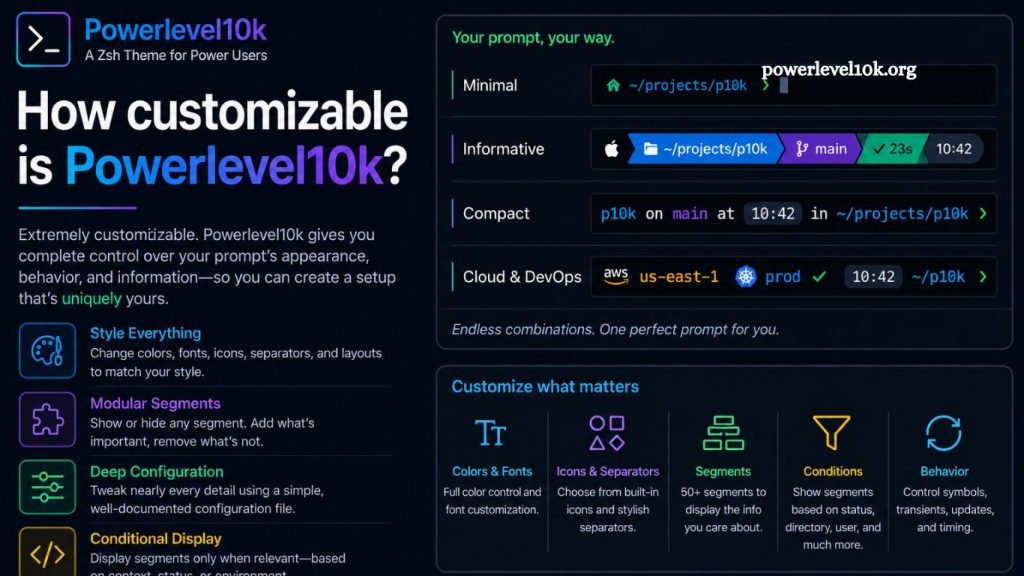
Powerlevel10k is one of the most advanced and flexible themes for the Zsh shell, widely used by developers seeking a fast, informative, and visually refined terminal experience. Built on top of Powerlevel9k, it focuses heavily on performance while offering deep customization options without sacrificing speed. Understanding how customizable Powerlevel10k is helps developers decide whether it fits their workflow, aesthetic preferences, and productivity needs.
What Makes Powerlevel10k Different
Powerlevel10k delivers a balance between speed and flexibility that few terminal themes achieve. Many prompt frameworks slow down the terminal due to heavy rendering or complex scripts. Powerlevel10k avoids this issue through optimized rendering logic and lazy evaluation techniques.
Users gain a responsive prompt even when multiple segments are enabled, such as Git status, environment indicators, command history, or cloud context. This performance foundation allows customization without introducing noticeable lag.
Read More: Powerlevel10k on Windows: Compatibility and Installation Guide
The theme also includes a built-in configuration wizard that detects system capabilities and suggests optimal settings. This feature removes guesswork and ensures a smooth setup process, even for users new to Zsh customization.
Core Customization Philosophy
Powerlevel10k follows a structured yet flexible customization model. Instead of requiring manual editing of complex configuration files, it uses a guided configuration system stored in a .p10k.zsh file.
This file controls every aspect of the prompt, including layout, icons, colors, segments, and conditional display logic. Users can edit it directly or regenerate it through the configuration wizard at any time.
Customization focuses on three key principles:
- Visual clarity
- Performance efficiency
- Modular configuration
Each element of the prompt acts as an independent module, allowing precise control over what appears and when.
Prompt Layout Customization
Powerlevel10k allows full control over prompt structure. Users can design multi-line or single-line prompts depending on workflow preferences.
Common layout options include:
- Left-aligned segments for context (directory, Git status, environment)
- Right-aligned segments for metadata (time, battery, background jobs)
- Multi-line prompts for improved readability
- Minimal prompts for distraction-free terminals
Each segment can be rearranged or removed entirely. Developers working in Git-heavy environments often prioritize repository status, while system administrators may highlight SSH sessions or execution context.
This flexibility supports a wide range of use cases, from lightweight terminal setups to information-rich dashboards.
Visual Style and Theming Options
Powerlevel10k provides extensive visual customization through icons, fonts, and color schemes. The theme supports Nerd Fonts, enabling thousands of glyphs for enhanced visual indicators.
Customization options include:
- Segment icons for Git, folders, languages, and tools
- Color coding for success, error, and warning states
- Segment separators with different shapes and styles
- Background and foreground color control
- Transparent or solid prompt styles
Users can align the terminal appearance with their editor theme, operating system, or personal aesthetic preferences. Developers often match Powerlevel10k with VS Code or Neovim themes for a consistent environment.
Git Integration Customization
Powerlevel10k provides one of the most detailed Git status integrations available in a shell prompt. It displays repository state in real time with high configurability.
Customizable Git indicators include:
- Branch name display
- Dirty state indicators (modified, staged, untracked files)
- Ahead/behind status relative to the remote
- Merge and rebase states
- Stash status
- Short or full commit hashes
Users can choose how much information appears at any time. A minimal setup may only show the branch name, while an advanced setup can display full repository diagnostics directly in the prompt.
This level of control helps developers reduce unnecessary commands like git status, improving workflow efficiency.
Segment-Based Architecture
Powerlevel10k organizes all prompt elements into segments. Each segment represents a functional unit such as a directory path, a language version, a battery level, or an execution time.
Customization at this level includes:
- Turning specific segments on or off
- Reordering segments within left or right prompt areas
- Conditional display rules based on context
- Custom segment creation using shell functions
Advanced users often build highly specialized prompts. For example, a Python developer may display virtual environment details only when inside a project directory, while a DevOps engineer may show Kubernetes context only when connected to a cluster.
Performance-Oriented Customization
Powerlevel10k prioritizes speed even with heavy customization. It achieves this through asynchronous rendering and optimized shell hooks.
Customization does not require sacrificing performance. Users can enable multiple features without noticeable lag, provided the system meets basic font and shell requirements.
Performance tuning options include:
- Turning off unused segments
- Reducing Git status refresh frequency
- Simplifying icon sets
- Limiting command execution in prompt rendering
These options ensure that even highly customized setups remain responsive under heavy terminal usage.
Configuration Wizard Experience
Powerlevel10k includes a configuration wizard that guides users through customization step by step. This tool detects terminal capabilities and recommends optimal settings.
The wizard allows users to:
- Choose prompt style (classic, lean, rainbow, minimal)
- Select icons and fonts
- Configure Git display preferences
- Adjust spacing and separators
- Preview changes in real time
The generated configuration file can be edited later, offering both guided and manual customization paths. This hybrid approach makes Powerlevel10k accessible to beginners while still supporting advanced users.
Advanced Customization Capabilities
Beyond standard settings, Powerlevel10k supports advanced modifications for experienced users. These include direct editing of Zsh functions and conditional logic inside .p10k.zsh.
Advanced capabilities include:
- Custom prompt segments using shell scripts
- Dynamic content based on environment variables
- Conditional styling depending on directory or user role
- Integration with external tools such as Docker, Node.js, or AWS CLI
- Time-based or state-based prompt changes
Developers often extend Powerlevel10k to act as a real-time status dashboard for development environments.
Compatibility and Integration
Powerlevel10k integrates smoothly with popular tools in the developer ecosystem. It works with Zsh frameworks like Oh My Zsh and Prezto, as well as standalone Zsh installations.
Common integrations include:
- Git and GitHub workflows
- Docker container status
- Node.js and Python environment indicators
- Cloud CLI tools like AWS and GCP
- Terminal multiplexers like tmux
This compatibility enhances its customization value by allowing the prompt to reflect real-time system and project states.
Limitations in Customization
Powerlevel10k offers deep customization while maintaining certain constraints to preserve performance and stability.
Limitations include:
- Requires a Zsh environment
- Depends on Nerd Fonts for full icon support
- Complex custom segments require shell scripting knowledge
- Some visual effects are limited by the terminal emulator capabilities
These constraints ensure consistency but may require initial setup effort for new users.
Practical Use Cases
Powerlevel10k customization benefits different user groups in unique ways:
- Developers streamline Git workflows and project navigation
- DevOps engineers monitor the system and deployment status in real time
- Data engineers track environments and dependencies efficiently
- Power users build minimal or highly informative terminal dashboards
Each use case demonstrates how flexible configuration transforms the terminal into a productivity tool rather than just a command interface.
Frequently Asked Questions
What is Powerlevel10k used for?
Powerlevel10k is a Zsh theme that customizes the terminal prompt with performance-focused design, Git integration, and rich visual elements.
Can beginners customize Powerlevel10k easily?
Yes, beginners can use the built-in configuration wizard to set up and customize the prompt without editing complex files.
How do I change the Powerlevel10k appearance?
You can adjust icons, colors, layout, and segments through the .p10k.zsh configuration file or the setup wizard.
Does Powerlevel10k slow down the terminal?
No, it is optimized for speed and remains fast even with advanced customization and multiple active prompt segments.
Can I create a minimal prompt with Powerlevel10k?
Yes, you can turn off most segments and design a clean, minimal terminal prompt for distraction-free usage.
Is Powerlevel10k compatible with Oh My Zsh?
Yes, Powerlevel10k works smoothly with Oh My Zsh, Prezto, and standard Zsh setups.
Can I add custom features to Powerlevel10k?
Yes, advanced users can create custom segments using shell scripting and integrate external tools like Docker or cloud CLIs.
Conclusion
Powerlevel10k delivers a highly flexible and performance-driven terminal customization experience for Zsh users. It allows full control over prompt structure, visual styling, Git integration, and segment behavior without sacrificing speed. The configuration system supports both beginners and advanced users, offering a guided setup alongside deep manual customization options.