
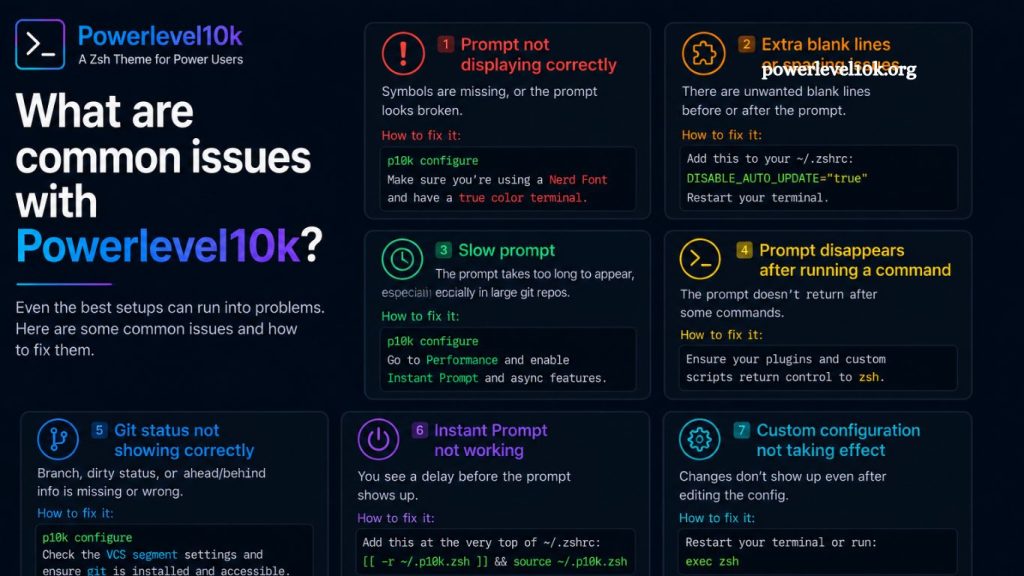
Powerlevel10k stands as one of the most powerful and visually appealing Zsh themes available today. Known for its speed, flexibility, and clean interface, it enhances terminal productivity for developers, DevOps engineers, and Linux users. Despite its strengths, users often encounter configuration challenges, display inconsistencies, and performance-related concerns. Understanding these issues and their solutions ensures a smoother and more efficient terminal experience.
This guide explores the most common Powerlevel10k issues, their root causes, and practical troubleshooting methods while maintaining optimal performance and customization.
Slow Terminal Performance After Installation
Performance degradation remains one of the most reported concerns among Powerlevel10k users. Even though the theme is designed for speed, improper configuration or heavy plugins can slow terminal startup.
Large Zsh frameworks such as Oh My Zsh, combined with multiple plugins, often introduce delays. These delays become noticeable when opening new terminal sessions or switching directories.
Read More: Powerlevel10k Customization Options Explained
Optimizing startup speed requires reducing unnecessary plugins and enabling instant prompt mode. Using a minimal .zshrc configuration significantly improves responsiveness. Replacing heavy frameworks with lightweight alternatives also enhances performance stability.
Incorrect Font Rendering and Symbol Issues
Broken icons, missing glyphs, and misaligned symbols frequently appear when the recommended Nerd Font is not installed. Powerlevel10k relies heavily on patched fonts to display icons correctly.
Default system fonts lack the required glyph support, resulting in question marks or empty boxes in the terminal interface. This issue often affects segments like Git status indicators, directory icons, and language symbols.
Installing a compatible font, such as MesloLGS NF, resolves most rendering issues. Terminal settings must also be updated to apply the selected font. Consistent font configuration across terminal emulators ensures uniform appearance.
Misconfigured Prompt Appearance
Unexpected prompt layouts often occur due to incomplete or incorrect configuration during the Powerlevel10k setup wizard. Users sometimes skip configuration steps or modify settings manually without understanding their impact.
Incorrect prompt segments may appear missing or duplicated. Alignment issues also emerge when segments overflow or wrap improperly.
Re-running the configuration wizard using p10k configure restores default settings and allows structured customization. Selecting appropriate prompt styles and segment visibility ensures a clean and readable interface.
Git Status Not Displaying Correctly
Git integration issues represent another frequent concern. Powerlevel10k displays repository status dynamically, but missing indicators often signal underlying configuration problems.
Common causes include disabled Git plugins, incorrect repository initialization, or outdated Git versions. In some cases, directories outside Git repositories still attempt to load Git segments, causing delays or empty output.
Enabling Git support in Zsh plugins and verifying repository integrity resolves most issues. Updating Git to the latest stable version further improves the compatibility and accuracy of status indicators.
Missing Icons and Powerline Symbols
Symbol inconsistencies typically arise from incompatible terminal settings or unsupported character encoding. Powerlevel10k uses Powerline and Nerd Font symbols to enhance visual structure.
When encoding is not set to UTF-8, terminal output may break or display incorrectly. Misconfigured locale settings also contribute to symbol corruption.
Ensuring UTF-8 encoding across the operating system and terminal emulator resolves most display issues. Verifying font fallback settings prevents unexpected symbol substitution.
Configuration Conflicts with Oh My Zsh
Powerlevel10k is frequently used alongside Oh My Zsh, but conflicts can arise from overlapping configurations. Multiple themes or plugin duplications often lead to unpredictable behavior.
Loading both themes simultaneously results in display glitches or performance slowdowns. Incorrect sourcing order in .zshrc files can also override Powerlevel10k settings.
Assigning Powerlevel10k as the sole theme and cleaning redundant configurations eliminates most conflicts. Streamlining plugin usage ensures a stable and predictable shell environment.
Prompt Not Loading Automatically
Failure of the theme to load at terminal startup usually indicates misconfigured shell initialization files. Incorrect theme declarations or missing source lines prevent Powerlevel10k from activating.
Syntax errors in .zshrc files also interrupt the loading process. Even minor typos can break the entire prompt system.
Verifying theme assignment and ensuring correct installation paths restores automatic loading. Reloading the shell or restarting the terminal applies the corrected configuration immediately.
Inconsistent Appearance Across Devices
Differences in appearance between machines often result from font installations or configuration files that are mismatched. Powerlevel10k depends on consistent environment settings for uniform output.
Transferring .zshrc files without installing the required fonts results in broken layouts on new systems. Variations in terminal emulators further amplify inconsistencies.
Standardizing configurations and using version-controlled dotfiles ensures consistent behavior. Installing identical fonts and themes across systems eliminates visual discrepancies.
High Memory Usage in Complex Setups
Although lightweight by design, Powerlevel10k may increase memory consumption when combined with extensive plugins and scripts. Large development environments with multiple tools exacerbate this issue.
Excessive background processes in shell initialization files also increase resource usage. Inefficient scripts running during prompt rendering can slow down performance.
Reducing plugin count and optimizing shell scripts improves memory efficiency. Profiling startup processes helps identify bottlenecks affecting system performance.
Theme Reset After System Updates
System or shell updates occasionally reset terminal configurations, causing Powerlevel10k settings to revert. This issue commonly occurs after upgrading Zsh or reinstalling terminal environments.
Loss of configuration files or overwritten .zshrc entries results in the default prompt appearance. Users may notice missing segments or fallback themes replacing Powerlevel10k.
Maintaining backups of configuration files prevents data loss. Reapplying theme settings after updates restores the intended prompt structure.
Compatibility Issues with Terminal Emulators
Not all terminal emulators fully support Powerlevel10k features. Older or minimal terminals may lack the rendering capabilities to display advanced symbols and colors.
Rendering inconsistencies appear as misaligned text or missing visual elements. Color profiles may also differ between terminal applications.
Switching to modern terminals such as Alacritty, Kitty, or GNOME Terminal improves compatibility. Ensuring true color support enhances overall visual fidelity.
Incorrect PATH or Environment Variable Behavior
Improper configuration of environment variables can interfere with Powerlevel10k initialization. Incorrect PATH settings may prevent required scripts from loading correctly.
Missing dependencies or altered system variables also disrupt prompt functionality. These issues often appear after manual system modifications or software installations.
Reviewing shell initialization files and restoring default PATH structures resolves most conflicts. Ensuring proper environment setup maintains stable theme performance.
Best Practices for Stable Powerlevel10k Usage
Maintaining a stable Powerlevel10k environment requires consistent configuration management and minimal plugin usage. Clean .zshrc files improve both speed and reliability.
Regular updates to Zsh, Git, and Powerlevel10k ensure compatibility with modern systems. Using a single theme without overlapping frameworks prevents conflicts.
Standardizing fonts, encoding, and terminal settings across all devices ensures a uniform experience. Periodic cleanup of unused plugins and scripts maintains long-term performance.
Frequently Asked Questions
Why is Powerlevel10k slow on my terminal?
Slow performance usually results from too many Zsh plugins or heavy frameworks like Oh My Zsh. Reducing the number of plugins and enabling instant prompt mode improves speed.
Why are icons and symbols not showing correctly?
Missing icons occur when Nerd Fonts are not installed. Installing a compatible font such as MesloLGS NF fixes display issues.
How do I fix a broken Powerlevel10k prompt layout?
Run p10k configure to restart the setup wizard and restore or customize the prompt layout properly.
Why is Git status not visible in Powerlevel10k?
This issue may happen due to disabled Git plugins, outdated Git versions, or incorrect repository setup. Enabling Git support resolves it.
Why does my terminal show boxes or question marks instead of symbols?
This happens when the terminal uses unsupported fonts or incorrect encoding. Switching to UTF-8 and Nerd Fonts solves the issue.
Why does Powerlevel10k reset after updates?
System or Zsh updates can overwrite .zshrc settings. Restoring your configuration file brings back the theme.
Which terminal works best with Powerlevel10k?
Modern terminals like Alacritty, Kitty, and GNOME Terminal offer better compatibility and full support for Powerlevel10k features.
Conclusion
Powerlevel10k delivers a fast, flexible, and visually refined Zsh experience, but issues often arise from misconfiguration, missing fonts, or plugin conflicts. Most problems are easy to resolve through proper setup, minimal dependencies, and consistent terminal settings.