
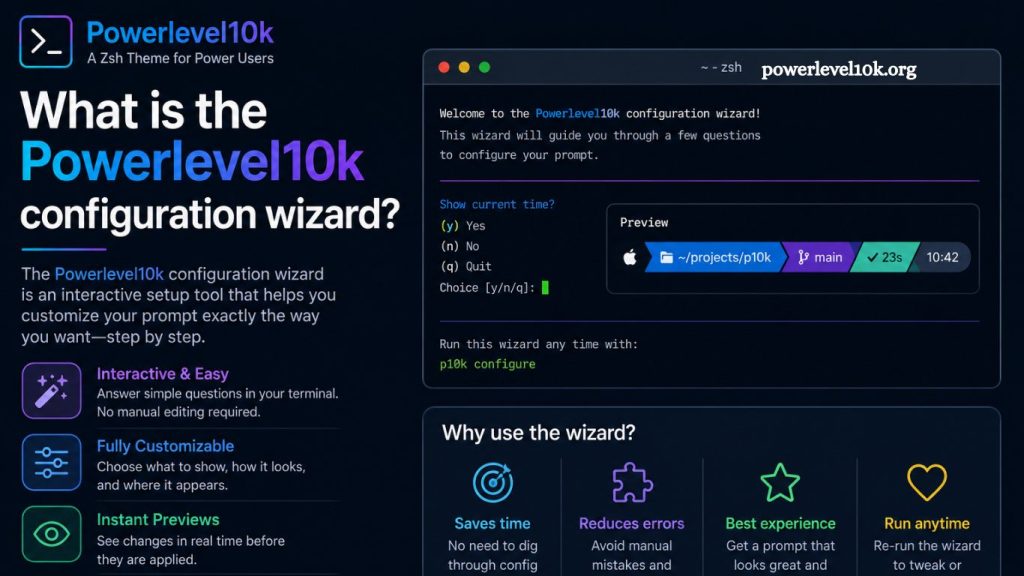
Powerlevel10k includes a powerful setup feature called the configuration wizard, designed to simplify customizing a terminal prompt. Rather than requiring manual editing of complex configuration files, the wizard guides users through a step-by-step interactive setup that instantly builds a personalized prompt tailored to individual preferences.
Powerlevel10k has become one of the most popular Zsh themes due to its speed, flexibility, and visually rich prompt design. The configuration wizard plays a central role in making this advanced tool accessible to both beginners and experienced developers. Understanding how it works helps users unlock the full potential of their terminal environment.
Purpose of the Powerlevel10k Configuration Wizard
The configuration wizard exists to eliminate complexity during initial setup. Traditional shell customization often requires editing dotfiles, learning syntax rules, and restarting the shell multiple times. Powerlevel10k removes these barriers by offering a guided interface that runs directly in the terminal.
Each step presents a clear choice, allowing users to define how their prompt should look and behave. The wizard then automatically generates the required configuration file. This approach reduces setup time from hours to minutes while ensuring accuracy.
Read More: Powerlevel10k Font Requirements: Are Special Fonts Necessary?
Developer productivity improves significantly when tools require less configuration overhead. Powerlevel10k focuses on delivering immediate visual feedback to ensure users understand each decision before proceeding.
How the Configuration Wizard Works
The wizard activates automatically when Powerlevel10k is installed for the first time or when no previous configuration exists. It runs inside the terminal and uses a question-and-answer format.
Each step adjusts a specific aspect of the prompt, including style, icons, layout, and the display of system information. After completing all steps, the wizard writes the configuration to a file, usually located in the .zshrc or a dedicated Powerlevel10k config file.
The process follows a logical flow:
- Initial prompt style selection
- Icon and glyph compatibility testing
- Segment layout configuration
- System information display preferences
- Final preview and confirmation
Every selection immediately reflects in a live preview, allowing users to visually evaluate changes before finalizing.
Key Features of the Wizard Interface
User experience remains at the core of the configuration wizard. Instead of requiring technical knowledge, it uses simple prompts and visual samples.
Live Preview System
Real-time preview functionality ensures every change is instantly visible. This eliminates guesswork and prevents misconfiguration. Users can see how Git status, directory paths, and system metrics will appear in the final prompt.
Font and Icon Compatibility Checks
Modern terminal themes rely heavily on special glyphs and Nerd Fonts. The wizard tests whether the current terminal supports these symbols and suggests improvements when necessary.
Structured Customization Flow
Customization occurs in a structured sequence rather than a random configuration. This ensures all important aspects of the prompt are covered without overwhelming the user.
Automatic Configuration File Generation
Manual editing becomes unnecessary. The wizard automatically generates optimized configuration code, reducing the risk of syntax errors.
Why the Wizard Matters for Developers
Terminal customization often intimidates users due to its technical nature. The Powerlevel10k configuration wizard removes that friction entirely.
Developers benefit in several ways:
- Faster onboarding for new environments
- Consistent prompt appearance across machines
- Reduced configuration errors
- Improved terminal readability
- Better focus during development tasks
Productivity increases when tools behave predictably. A well-designed prompt provides immediate context, such as the current directory, Git branch status, and background process indicators.
Step-by-Step Experience of Using the Wizard
Launching the wizard begins with a simple command or automatic trigger. The interface then starts presenting options one by one.
Step 1: Prompt Style Selection
Users choose between minimal, classic, or feature-rich prompt styles. Each option changes the density of information displayed in the terminal.
Step 2: Icon Rendering Test
The wizard checks whether symbols render correctly. If issues appear, it recommends installing compatible fonts.
Step 3: Segment Layout Configuration
Prompt segments such as directory path, Git status, and execution time are arranged. Users decide what appears and where it appears.
Step 4: Color Scheme Adjustment
Color preferences enhance readability. The wizard provides balanced presets optimized for different terminal backgrounds.
Step 5: System Information Toggles
Optional information such as battery status, execution time, and command history can be enabled or disabled.
Step 6: Final Preview Screen
A full preview displays the completed prompt. Adjustments remain possible before saving.
Design Philosophy Behind the Wizard
Simplicity drives the entire design of Powerlevel10k. Rather than forcing users to learn configuration syntax, the wizard translates complex options into human-readable choices.
This philosophy aligns with modern developer tooling trends that prioritize usability without sacrificing power. The system ensures that advanced features remain accessible without overwhelming users.
Efficiency also plays a major role. The wizard completes setup quickly while maintaining precision. Every decision maps directly to configuration logic, reducing ambiguity.
Common Use Cases for Powerlevel10k
Different developers use Powerlevel10k for different reasons, but several patterns emerge consistently:
- Software development workflows requiring Git integration
- System administration tasks needing quick context awareness
- DevOps environments where terminal speed matters
- Learning environments for shell scripting
- Personal productivity optimization
Each use case benefits from a clean, informative, and responsive terminal prompt.
Advantages Over Manual Configuration
Manual prompt configuration requires a deep understanding of shell scripting and prompt variables. Errors often lead to broken terminals or missing features.
The wizard eliminates these issues by:
- Preventing syntax mistakes
- Offering validated choices only
- Providing instant feedback
- Automating configuration file creation
- Ensuring compatibility with terminal environments
This structured approach significantly reduces setup complexity.
Performance Optimization in Powerlevel10k
Speed remains one of Powerlevel10k’s strongest features. Unlike older themes that slow down terminal startup, it is optimized for performance.
The configuration wizard ensures that users only enable necessary features. This prevents unnecessary overhead and keeps the prompt responsive even in large repositories.
Efficient rendering techniques minimize latency when switching directories or executing commands.
Customization Flexibility After Setup
Although the wizard handles initial configuration, users can still modify settings later. The configuration file remains fully editable, allowing advanced customization.
Power users often refine:
- Prompt segments
- Color schemes
- Git indicators
- Command execution timing display
- Conditional formatting rules
This flexibility ensures the tool scales with user expertise.
Troubleshooting Wizard Issues
Occasional issues may arise due to terminal setup or font compatibility. Common fixes include:
- Installing Nerd Fonts for proper icon rendering
- Updating terminal emulator settings
- Re-running the changes
- Checking .zshrc configuration for conflicts
Most issues resolve quickly due to Powerlevel10k’s modular structure.
Best Practices for Using the Wizard
Optimal results come from thoughtful selection during setup. Users should consider:
- Choosing a layout that matches workflow intensity
- Avoiding excessive information clutter
- Ensuring font compatibility before customization
- Testing configurations in a clean terminal session
Balanced configuration improves readability and reduces cognitive load.
Frequently Asked Questions
What is the Powerlevel10k configuration wizard?
The Powerlevel10k configuration wizard is an interactive setup tool in Powerlevel10k that helps users customize their terminal prompt step by step without manual coding.
Do I need technical skills to use the wizard?
No technical expertise is required. The wizard uses simple questions and live previews, making it easy for beginners and advanced users alike.
When does the configuration wizard run?
It typically runs automatically during the first installation of Powerlevel10k or when no existing configuration file is detected.
Can I rerun the wizard runner setup?
Yes, users can rerun the wizard to update or rebuild their terminal prompt configuration based on new preferences.
Does the wizard affect terminal performance?
No, the wizard only handles setup. Once the configuration is complete, Powerlevel10k remains optimized for fast terminal performance.
What happens after completing the wizard?
The wizard generates and saves a configuration file that controls the appearance and behavior of your terminal prompt.
Can I customize Powerlevel10k manually after using the wizard?
Yes, advanced users can still edit configuration files manually to fine-tune the prompt beyond the wizard’s default options.
Conclusion
The Powerlevel10k configuration wizard in Powerlevel10k simplifies terminal customization through a structured, interactive setup process. It removes the need for manual configuration, reduces errors, and provides a fast way to build a clean, functional terminal prompt.