
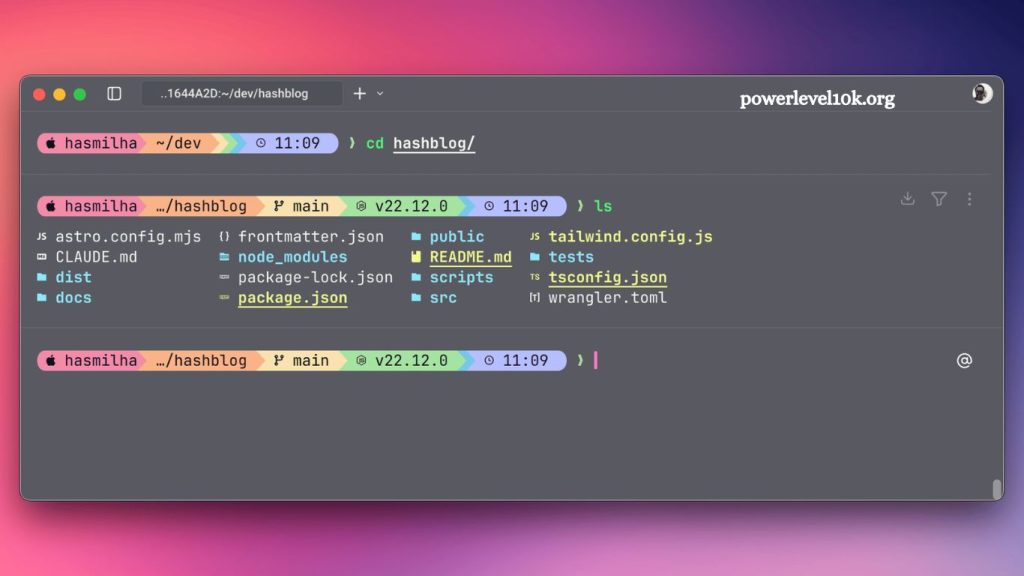
Developers constantly search for faster, cleaner, and more customizable terminal experiences. Modern command-line workflows demand speed, productivity, and visual clarity. Among countless shell customization tools, Powerlevel10k and Oh My Zsh dominate conversations within the developer community. Many users ask one important question: Is Powerlevel10k compatible with Oh My Zsh?
Simple answer: yes. Powerlevel10k works perfectly with Oh My Zsh and delivers one of the best terminal customization experiences available today. Thousands of developers combine both tools to create responsive, beautiful, and highly efficient terminal environments.
This guide explains compatibility, installation, configuration, benefits, troubleshooting, and optimization tips for using Powerlevel10k with Oh My Zsh.
Read More: Install Powerlevel10k on Zsh: Step-by-Step Guide
Understanding Powerlevel10k
Powerlevel10k represents a high-performance theme for Zsh. Developers designed it as a replacement for older themes that slowed terminal performance. Unlike traditional shell themes, Powerlevel10k focuses heavily on speed, customization, and visual efficiency.
Features include:
- Instant prompt rendering
- Git integration
- Status indicators
- Custom icons
- Context-aware prompts
- Advanced configuration wizard
- Lightweight performance
Powerlevel10k evolved from the popular Powerlevel9k project and dramatically improved responsiveness. Large repositories and complex environments no longer slow terminal startup times.
Developers working with Git, Docker, Kubernetes, Python, Node.js, or cloud platforms often prefer Powerlevel10k because it displays critical information directly inside the command prompt.
Understanding Oh My Zsh
Oh My Zsh serves as a framework for managing Zsh configurations. Instead of manually editing shell settings, users install Oh My Zsh to simplify plugin and theme management.
Core features include:
- Plugin support
- Theme management
- Aliases and shortcuts
- Auto-completion enhancements
- Easy shell customization
- Large community support
Oh My Zsh helps developers organize their shell environments efficiently. Beginners appreciate its simplicity, while advanced users enjoy its flexibility.
Because Powerlevel10k functions as a Zsh theme, Oh My Zsh provides an ideal environment for managing it.
Is Powerlevel10k Compatible With Oh My Zsh?
Yes, Powerlevel10k fully supports Oh My Zsh. Developers specifically designed Powerlevel10k to integrate smoothly into existing Oh My Zsh installations.
Users commonly install Powerlevel10k as their primary Oh My Zsh theme. Compatibility remains stable across:
- macOS
- Linux distributions
- WSL (Windows Subsystem for Linux)
- Remote SSH environments
Many developers consider this combination the gold standard for terminal customization because it balances aesthetics, performance, and usability.
Why Developers Combine Powerlevel10k With Oh My Zsh
Strong compatibility alone does not explain the popularity of this setup. Several practical advantages make this combination extremely attractive.
Faster Terminal Performance
Traditional shell themes often introduce lag, especially inside large Git repositories. Powerlevel10k minimizes delays with optimized rendering.
Commands execute quickly, prompts appear instantly, and navigation feels smoother.
Better Visual Organization
Powerlevel10k organizes terminal information clearly. Developers instantly see:
- Git branch status
- Background jobs
- Virtual environments
- Exit codes
- Kubernetes contexts
- SSH sessions
Visual indicators reduce mistakes and improve productivity.
Easy Customization
Oh My Zsh simplifies plugin management while Powerlevel10k handles prompt customization. Combined, users gain complete control over terminal appearance and behavior.
Developers can customize:
- Colors
- Prompt segments
- Icons
- Command timing
- Directory display
- Git status visibility
- Beginner-Friendly Setup
Despite advanced functionality, setup remains surprisingly simple. Powerlevel10k includes a configuration wizard that guides users through prompt customization step by step.
Even beginners can create professional-looking terminals within minutes.
How To Install Powerlevel10k With Oh My Zsh
Installation requires only a few commands. Most users complete the setup within 10 minutes.
Step 1: Install Oh My Zsh
Users without Oh My Zsh installed can run:
sh -c "$(curl -fsSL https://raw.githubusercontent.com/ohmyzsh/ohmyzsh/master/tools/install.sh)"After installation, restart the terminal.
Step 2: Clone Powerlevel10k
Run this command:
git clone --depth=1 https://github.com/romkatv/powerlevel10k.git ${ZSH_CUSTOM:-$HOME/.oh-my-zsh/custom}/themes/powerlevel10kThis command downloads the theme into the Oh My Zsh themes directory.
Step 3: Update .zshrc
Open the .zshrc configuration file:
nano ~/.zshrcFind this line:
ZSH_THEME="robbyrussell"Replace it with:
ZSH_THEME="powerlevel10k/powerlevel10k"Save changes.
Step 4: Restart Terminal
Restart the terminal or run:
source ~/.zshrcPowerlevel10k launches its configuration wizard automatically.
Configuring Powerlevel10k
Powerlevel10k includes an interactive setup process that helps users customize prompts visually.
Users can choose:
- Prompt styles
- Icon visibility
- Unicode compatibility
- One-line or two-line prompts
- Compact or verbose layouts
Configuration settings save automatically inside:
~/.p10k.zshUsers can rerun the configuration anytime with:
p10k configureBest Fonts For Powerlevel10k
Powerlevel10k relies on special glyphs and icons. Nerd Fonts provide full compatibility.
Popular choices include:
- MesloLGS NF
- FiraCode Nerd Font
- JetBrainsMono Nerd Font
- Hack Nerd Font
MesloLGS NF remains the recommended option because Powerlevel10k developers optimized it specifically for prompt rendering.
Without Nerd Fonts, symbols may appear broken or misaligned.
Common Problems And Fixes
Although compatibility remains excellent, users occasionally face minor issues.
Broken Icons
Cause:
Missing Nerd Font installation.
Fix:
Install MesloLGS NF and configure terminal font settings correctly.
Slow Startup Times
Cause:
Too many plugins are loaded through Oh My Zsh.
Fix:
Reduce unnecessary plugins inside .zshrc.
Example:
- plugins=(git z docker)
- Avoid loading dozens of plugins simultaneously.
- Configuration Wizard Not Starting
Cause:
Theme not activated properly.
Fix:
Verify this line inside .zshrc:
- ZSH_THEME=”powerlevel10k/powerlevel10k”
- Then reload the shell.
- Colors Look Incorrect
Cause:
Terminal lacks true color support.
Fix:
Use modern terminal applications like:
- iTerm2
- Windows Terminal
- Kitty
- Alacritty
- GNOME Terminal
- Powerlevel10k Performance Benefits
Performance represents one of Powerlevel10k’s biggest advantages.
Older themes often slow terminals down because they continuously execute multiple shell commands. Powerlevel10k uses optimized asynchronous rendering techniques to avoid lag.
Benefits include:
- Faster Git status updates
- Reduced CPU usage
- Instant prompt display
- Smooth repository navigation
Developers working inside large projects notice major improvements immediately.
Recommended Oh My Zsh Plugins
Several plugins work especially well with Powerlevel10k.
Git Plugin
Provides Git aliases and shortcuts.
- plugins=(git)
- Z Plugin
Tracks frequently visited directories for faster navigation.
- plugins=(z)
- Docker Plugin
Simplifies Docker commands.
- plugins=(docker)
- Autosuggestions Plugin
Suggests commands based on history.
plugins=(zsh-autosuggestions)
Syntax Highlighting Plugin
Highlights commands for readability.
plugins=(zsh-syntax-highlighting)
Combining these plugins with Powerlevel10k creates an efficient development environment.
Powerlevel10k Vs Other Zsh Themes
Developers often compare Powerlevel10k with other themes.
Agnoster
Agnoster introduced segmented prompts but lacks Powerlevel10k’s speed optimizations.
Spaceship Prompt
Spaceship offers modular customization but generally performs more slowly in complex repositories.
Pure
Pure focuses on minimalism but sacrifices advanced visual indicators.
Powerlevel9k
Powerlevel10k directly improves upon Powerlevel9k with faster rendering and better optimization.
For most developers, Powerlevel10k delivers the best balance of speed, aesthetics, and functionality.
Advanced Customization Options
Advanced users can modify nearly every aspect of Powerlevel10k.
Customization options include:
- Left and right prompts
- Git segment formatting
- Background colors
- Battery indicators
- VPN status
- Kubernetes namespaces
- AWS profiles
- Execution timing
Users edit settings inside:
~/.p10k.zsh
Because configuration remains modular, developers can create highly personalized terminal experiences.
Productivity Improvements
Terminal customization affects productivity more than many developers realize.
Powerlevel10k reduces cognitive load by presenting information visually instead of forcing users to run additional commands.
Examples include:
- Seeing Git branch status instantly
- Identifying failed commands immediately
- Recognizing remote SSH sessions clearly
- Viewing programming environments automatically
These small improvements save significant time across daily workflows.
Security Advantages
Powerlevel10k also helps prevent mistakes.
Visual prompts warn users when connected to:
- Production servers
- Root accounts
- Remote systems
- Kubernetes clusters
Clear indicators reduce risks associated with destructive commands.
Many DevOps engineers rely heavily on these visual cues.
Powerlevel10k Works Across Multiple Environments
Another major advantage involves portability.
Users can maintain nearly identical terminal experiences across:
- macOS laptops
- Linux servers
- Docker containers
- WSL environments
- Cloud-based development machines
Consistent workflows improve efficiency and reduce friction in learning across systems.
Should Beginners Use Powerlevel10k?
Absolutely.
Although Powerlevel10k offers advanced customization, installation remains beginner-friendly.
New developers benefit from:
- Better terminal readability
- Easier Git management
- Faster navigation
- Professional development environments
Because Oh My Zsh simplifies plugin management, beginners rarely struggle with setup.
Frequently Asked Questions
Is Powerlevel10k compatible with Oh My Zsh?
Yes, Powerlevel10k works fully with Oh My Zsh and integrates smoothly as a Zsh theme.
How do I install Powerlevel10k with Oh My Zsh?
Clone the Powerlevel10k repository into the Oh My Zsh themes folder, then set it in your .zshrc file.
Does Powerlevel10k slow down Oh My Zsh?
No, it is optimized for high performance and usually improves terminal speed compared to older themes.
Do I need special fonts for Powerlevel10k?
Yes, Nerd Fonts like MesloLGS NF are recommended for proper icon and symbol display.
Can I use plugins with Powerlevel10k and Oh My Zsh?
Yes, all Oh My Zsh plugins work normally alongside Powerlevel10k without conflicts.
Why are icons broken in my terminal?
Broken icons usually mean the Nerd Font is not installed or not selected in terminal settings.
Can I customize Powerlevel10k after installation?
Yes, you can rerun the configuration wizard at any time using p10k configure for full customization.
Conclusion
Powerlevel10k integrates seamlessly with Oh My Zsh and delivers a fast, modern, and highly customizable terminal experience. It enhances productivity through clear visual cues, strong Git support, and optimized performance without compromising system speed. When paired with Oh My Zsh, it creates a stable and efficient workflow suitable for both beginners and advanced developers.